Installing the Diode Adapter
Last Updated:
2 min read
Introduction
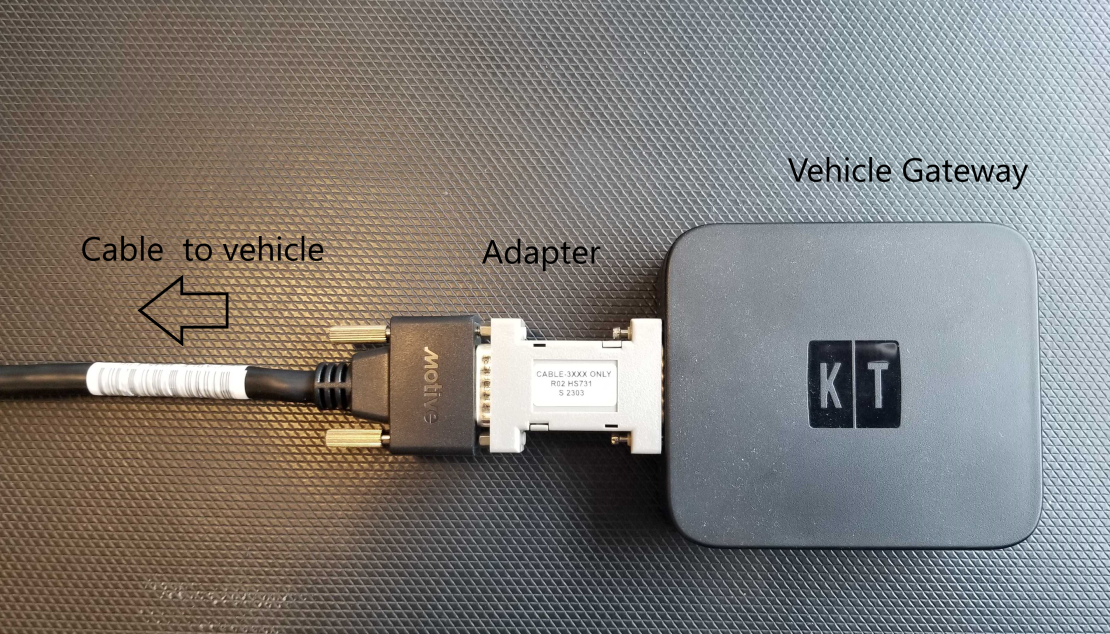
This article will show you how to install the reverse polarity diode adapter on your Vehicle Gateway
Steps
Connect the adapter in between the Vehicle Gateway and the Motive cable that connects to the vehicle as seen below.
Was this article helpful?
This article also appears under:
https://helpcenter.gomotive.com/hc/en-us/articles/31054123805853-Driver-App-Overview
/hc/theming_assets/01KKVSF7R9BYPJHBFYCBSTBET4
For drivers
Learn how to use the Driver App, including how to connect to vehicles, edit logs, and more.
custom
https://helpcenter.gomotive.com/hc/en-us/categories/5364685085597-Products
/hc/theming_assets/01KKVSG6V71TFQCF03T588QA30
For fleet managers
Learn how to use the Fleet Dashboard and Fleet App to manage your vehicles, compliance, safety, and more.
custom
https://helpcenter.gomotive.com/hc/en-us/categories/5364621713565-Hardware
/hc/theming_assets/01KKVT2VW7PRS8DK384JNFG62D
For installers
Learn how to install Motive hardware, including Vehicle Gateways, dashcams, and more.
Reset password, add a vehicle, install vehicle gateway (ELD)